Pros and Cons of Google Maps Route Optimisation for Businesses

Table of Contents
Google Maps Route Optimisation
Your business is growing. What started as a founder making 5-10 daily drop-offs has evolved into multiple drivers handling dozens of deliveries each day. Route planning, once a simple task done on the fly, has become a time-consuming puzzle that eats up hours every morning.
Your Operations Manager faces a decision: stick with the familiar – manually planning routes using Google Maps – or invest in dedicated route optimisation software. Google Maps is free, everyone knows how to use it, and it’s right there on every device. Surely that’s good enough for a growing business?
It’s a question thousands of businesses grapple with. Google Maps is the world’s most popular navigation tool with over two billion users. It’s the obvious first choice when you need to plan routes. But is “obvious” the same as “right” for your business?
The truth is, there’s a significant difference between personal navigation and professional route optimisation. What works brilliantly for finding a restaurant or navigating to a meeting often falls short when you’re coordinating multiple drivers, managing dozens of daily deliveries, and trying to minimise costs whilst maximising efficiency.
In this guide, we’ll explore both the advantages and disadvantages of Google Maps for business route planning. You’ll discover exactly when it’s a suitable solution, where its limitations become costly problems, and how to know whether you need professional route optimisation software. By the end, you’ll have the clarity to make an informed decision about the right route planning approach for your business.
Quick Answer: Is Google Maps Route Optimisation Good for Business?
Short answer: Google Maps works for simple routes with fewer than 10 stops, but it’s inadequate for serious business operations. The 10-stop limitation, lack of multi-driver optimisation, absence of real-time tracking, and inability to schedule routes make it unsuitable for delivery businesses, courier services, and fleet management.
Best for: Personal navigation, 1-5 stop routes, occasional business trips
Not suitable for: Daily deliveries, fleet operations, 10+ stops, multi-driver coordination
What is Google Maps Route Planner?

You’ve probably used, if not at least heard of, Google Maps. But in terms of route planning, the solution provides an online mapping and navigation service developed by Google that allows users to plan routes with multiple stops. Available both as a web-based application and as a mobile app for Android and iOS devices, it provides detailed maps, satellite imagery, and real-time traffic updates for locations around the world.
For businesses, Google Maps route planner offers basic functionality to create multi-stop routes by entering multiple addresses manually. Users can access directions for walking, driving, and public transport, along with local business information and estimated arrival times.
How businesses currently use Google Maps route planner:
- Creating multi-stop routes: By entering addresses one by one, businesses can plan a route with up to 10 destinations
- Real-time traffic updates: Drivers can view current traffic conditions to avoid congestion and find alternative routes
- Basic navigation: Turn-by-turn directions help drivers reach their destinations
- Location tracking: Drivers can share their location with dispatchers (though this requires manual setup)
Whilst these features sound useful, the reality is that Google Maps was built for individual consumers, not business operations – and this becomes painfully clear once you try to scale beyond a handful of stops.
5 Advantages of Google Maps for Business Route Planning

Before diving into the limitations, let’s acknowledge why some businesses are tempted to use Google Maps for route planning, despite its drawbacks. Understanding these advantages helps explain why it works for certain use cases – and why alternatives are necessary when you outgrow them.
1. Completely free and universally accessible
Google Maps is free to use with no subscription fees, licensing costs, or per-user charges. It’s accessible on desktop computers, smartphones, and tablets, making it easy for any team member to access without budget approval or procurement processes. For small businesses just starting out or handling very simple routing needs, this zero-cost entry point is attractive.
2. Familiar interface with zero training required
Google Maps is widely recognised and trusted by millions of people who use it regularly for personal navigation. Most drivers already know how to use it, which means there’s virtually no learning curve or training time required. This familiarity reduces resistance to adoption and lets teams start immediately without onboarding overhead.
3. Real-time traffic updates and alternative routes
One of Google Maps’ strongest features is its real-time traffic data, powered by millions of users and sophisticated algorithms. The route planner can identify traffic congestion, accidents, and road closures, then suggest alternative routes to save time and reduce fuel costs. This dynamic routing capability is genuinely valuable for navigating busy urban environments.
4. Basic integration with other business tools
Google Maps can integrate with some delivery management software, GPS tracking tools, and calendar applications, providing a basic foundation for managing simple deliveries. For businesses already using Google Workspace, the integration with Google Calendar and Gmail offers some convenience for appointment-based routes.
5. Excellent for simple, occasional routes
For businesses that only occasionally need to plan routes – such as a small office making a supply run, a sales rep visiting 3-4 clients, or a service professional with a few appointments – Google Maps works perfectly well. The interface is intuitive, the directions are accurate, and the simplicity is actually an advantage when complexity isn’t needed.
7 Critical Limitations of Google Maps Route Optimisation for Business
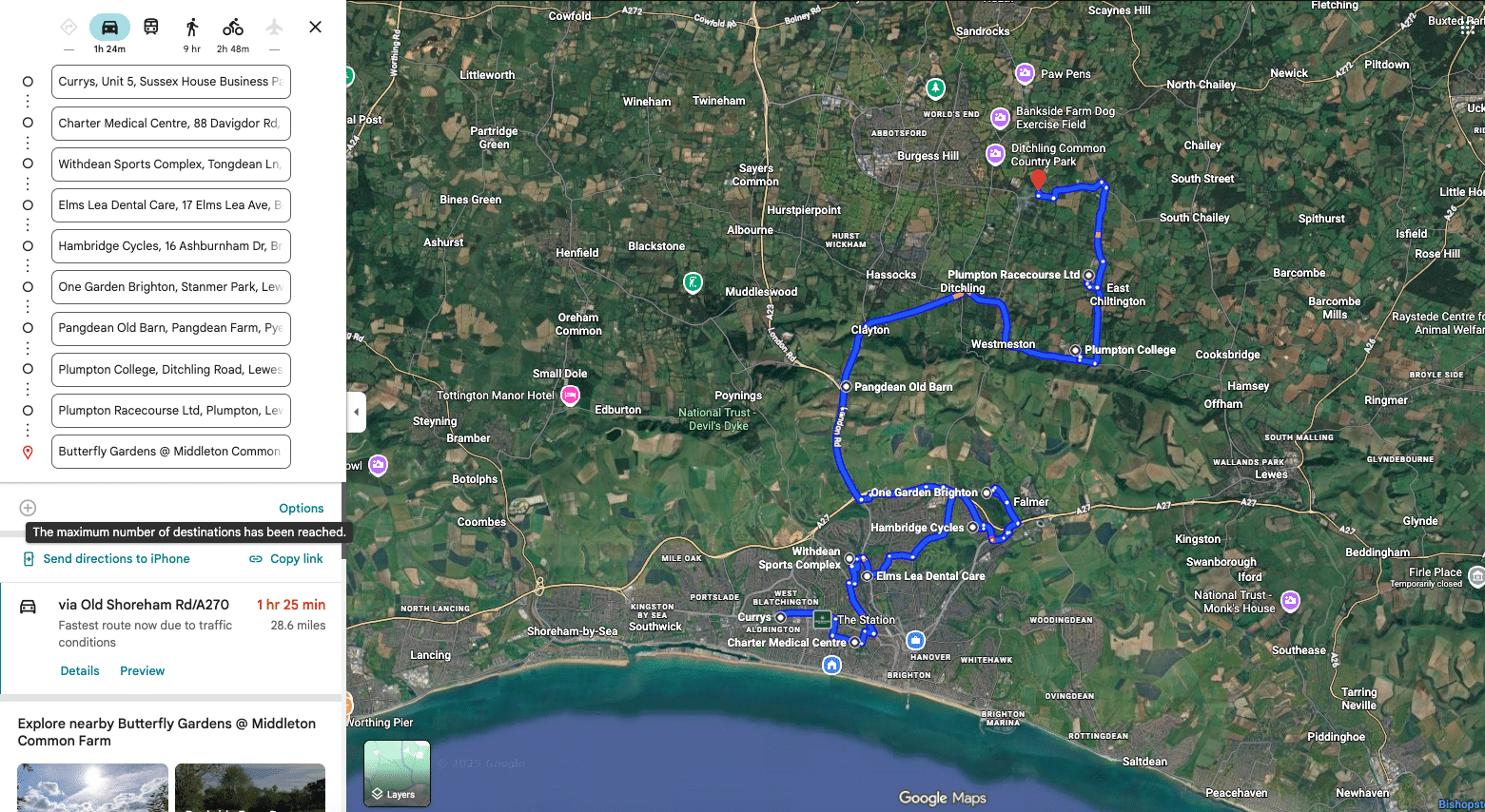
Whilst Google Maps has its place, it’s certainly not the best option for businesses looking for professional route optimisation. Here are the significant limitations that make it unsuitable for serious delivery and fleet operations:
1. Maximum 10 stops per route (no bulk upload)
The limitation: Google Maps only allows a maximum of 10 destinations (including your starting point) per route. This is a hard limit that cannot be exceeded or worked around within the platform.
Why it matters: Most delivery businesses, courier services, and field service operations handle 15-50+ stops per vehicle per day. Even a small operation with just 5 drivers making 25 deliveries each needs to manage 125 stops daily – requiring 13 separate Google Maps routes that must be created and managed individually.
The real cost:
– A logistics manager must manually create multiple route segments, spending 2-4 hours on route planning daily
– Each address must be entered manually – no bulk CSV upload option exists
– Routes cannot be optimised across all stops simultaneously, missing significant efficiency gains
– Coordination between multiple route segments becomes a logistical nightmare
Business impact example: A bakery delivering to 30 wholesale customers daily must create 3 separate Google Maps routes. The owner spends 45 minutes each morning manually entering addresses, only to realise the routes overlap and could have been optimised better if viewed holistically. Result: wasted fuel, longer delivery times, and frustrated drivers dealing with inefficient routes.
What you need instead: Professional route optimisation software handles unlimited stops with bulk CSV upload capabilities, automatically distributing deliveries across your fleet whilst considering driver capacity, delivery time windows, vehicle types, and traffic patterns. What takes 3 hours in Google Maps takes 10 minutes with proper software.
2. Requires manual address entry (prone to human error)
The limitation: Every single address must be manually typed or copied into Google Maps route planner. There’s no way to upload a list of addresses from Excel, your CRM, or your order management system.
Why it matters: Manual data entry is not only time-consuming but also highly error-prone. A simple typo in a postcode or street name can send a driver to the wrong location, completely disrupting the planned route and causing cascading delays throughout the day.
The real cost:
– Each address takes 15-30 seconds to enter, adding up to significant time waste daily
– Typos and copy-paste errors occur frequently, especially when rushed
– No validation system to catch address mistakes before dispatch
– Fixing errors mid-route requires calling drivers and manually updating routes
What you need instead: Route optimisation software with bulk upload functionality that validates addresses automatically, flags potential errors, and integrates directly with your order management system to eliminate manual data entry entirely.
3. No multi-driver or multi-vehicle optimisation
The limitation: Google Maps can only create one route at a time. It has no concept of multiple drivers, vehicles with different capacities, or optimising workload distribution across a fleet.
Why it matters: True route optimisation isn’t just about planning individual routes – it’s about intelligently distributing stops across multiple drivers to balance workload, minimise total distance travelled, and ensure deliveries happen efficiently across your entire operation.
The real cost:
– One driver may have 30 stops, whilst another has only 15, creating unfair workload distribution
– Routes overlap geographically, with multiple drivers visiting the same neighbourhoods inefficiently
– Cannot account for vehicle capacity constraints (refrigerated trucks, weight limits, etc.)
– Impossible to reassign stops between drivers when someone calls in sick, or a vehicle breaks down
Business impact example: A courier company with 8 drivers manually creates routes in Google Maps. Driver A gets assigned 20 stops in one area whilst Driver B has 18 stops that partially overlap the same territory. The logistics manager doesn’t see this overlap until drivers are already on the road, resulting in 40+ miles of unnecessary driving and two late deliveries because stops weren’t distributed efficiently.
What you need instead: Fleet route optimisation that considers all drivers simultaneously, balances workloads fairly, respects vehicle constraints, and minimises the total distance travelled across your entire operation.
4. Cannot schedule routes in advance
The limitation: Google Maps only provides on-demand route planning. You must manually create routes each day, and there’s no way to schedule routes for future dates or assign them to specific drivers in advance.
Why it matters: Efficient logistics operations require planning ahead. Businesses with recurring delivery schedules, subscription services, or regular service routes need the ability to plan multiple days or weeks in advance, not scramble each morning to create that day’s routes.
The real cost:
– Logistics managers must arrive early every day to manually create routes
– No ability to plan for seasonal demand fluctuations or holiday scheduling
– Cannot assign specific routes to specific drivers based on expertise, territory knowledge, or availability
– Impossible to provide customers with advance notice of delivery windows
What you need instead: Route planning software with scheduling capabilities that let you plan days or weeks ahead, assign routes to specific drivers, set recurring schedules, and provide customers with accurate delivery windows in advance.
5. No real-time driver tracking or performance analytics
The limitation: Google Maps offers no built-in tracking of driver progress, location monitoring, or performance metrics. Whilst drivers can manually share their location via Google Maps, this requires constant manual intervention and provides no centralised dashboard for fleet oversight.
Why it matters: Modern logistics operations require real-time visibility into driver locations, delivery progress, and route adherence. Without tracking, businesses operate blind – unable to provide customers with accurate ETAs, proactively address delays, or identify performance improvements.
The real cost:
– Dispatchers must call drivers repeatedly to determine their current location and progress
– No way to notify customers proactively about delivery status or delays
– Cannot identify which drivers consistently run late or deviate from optimal routes
– No data to analyse route efficiency, average delivery times, or fuel consumption
– Unable to provide proof of delivery or visit documentation
Business impact example: A customer calls asking about their delivery ETA. The dispatcher has no visibility into where the driver is or how many stops remain, forcing an awkward “I’ll call the driver and get back to you” conversation. The driver doesn’t answer because they’re mid-delivery. The customer gets frustrated. This scenario repeats 10+ times daily.
What you need instead: Route optimisation software with real-time GPS tracking, automated customer notifications, performance analytics, proof of delivery capture, and comprehensive reporting to continuously improve operations.
6. Routes cannot be modified or updated dynamically
The limitation: Once a route is created in Google Maps, it’s essentially final. If a customer needs to reschedule, a last-minute order comes in, or a delivery fails, you cannot easily modify the route or redistribute stops without starting over from scratch.
Why it matters: Delivery operations are inherently dynamic. Last-minute orders, cancellations, traffic incidents, and customer reschedules happen constantly. Your route planning system needs to handle these changes gracefully without requiring complete route recreation.
The real cost:
– Logistics managers must call drivers to manually communicate route changes
– No record of modifications, leading to confusion and mistakes
– Failed deliveries cannot be easily reassigned to other drivers in the area
– Last-minute orders often can’t be accommodated, resulting in lost revenue
What you need instead: Dynamic route optimisation that allows real-time modifications, automatic re-optimisation when changes occur, and instant communication of updates to drivers through mobile apps.
7. No delivery time windows or customer constraints
The limitation: Google Maps has no concept of delivery time windows, appointment scheduling, or customer-specific constraints. It simply provides directions from point A to B to C, with no consideration for “Customer A is only available 2-4pm” or “Customer B requires a call 30 minutes before arrival.”
Why it matters: Many businesses operate with time-sensitive deliveries, scheduled service appointments, or customer preferences that must be honoured. Ignoring these constraints leads to missed delivery windows, unhappy customers, and wasted trips.
The real cost:
– Drivers arrive outside customer availability windows, resulting in failed deliveries
– No way to automatically optimise routes whilst respecting time constraints
– Cannot prioritise urgent deliveries or deprioritise flexible ones
– Customer service requirements (call ahead, special instructions) get overlooked
What you need instead: Route optimisation with time window constraints, appointment scheduling, priority levels, and customer-specific requirements built into the optimisation algorithm.
Google Maps vs Professional Route Optimisation Software
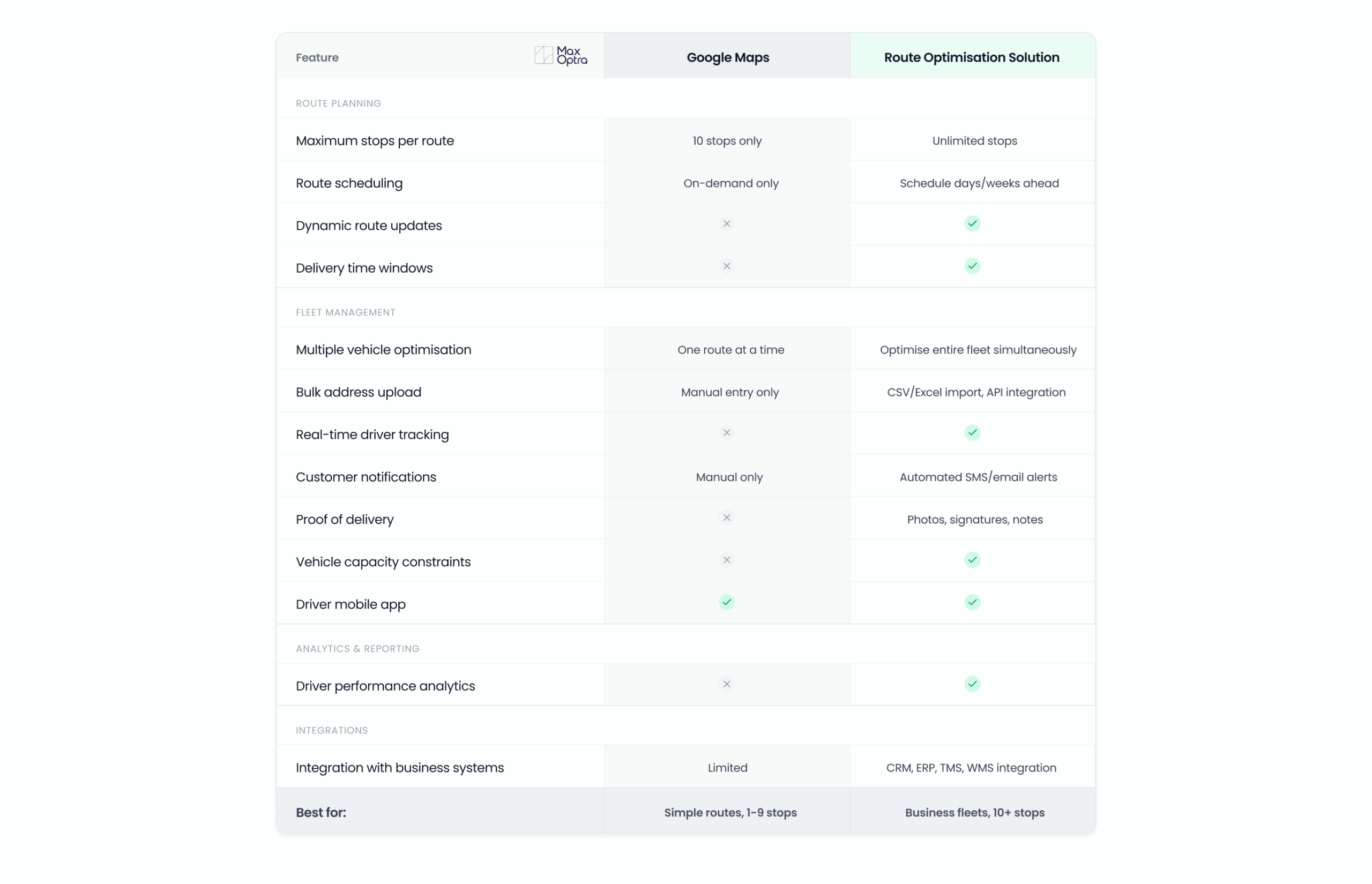
To help you understand exactly what you’re missing with Google Maps route optimisation, here’s a detailed feature comparison:
When Google Maps Route Optimisation works (and when it doesn’t)
Google Maps is suitable for:
- Personal errands and simple trips: Running to 3-4 stores, visiting friends, weekend activities
- Occasional business routes: Sales rep visiting 2-3 clients, office supply runs, single-day field trips
- Very small operations: Solo entrepreneurs with fewer than 5 stops per day
- Ad-hoc routing: Unplanned trips, emergency service calls, one-off deliveries
- Budget-constrained startups: Brand new businesses testing delivery operations before investing in software
Google Maps is NOT suitable for:
- Daily delivery operations: Any business making regular deliveries with 10+ stops per vehicle
- Fleet management: Operations with 2+ vehicles that need coordinated routing
- Time-sensitive deliveries: Services requiring appointment scheduling or delivery time windows
- Customer-facing operations: Businesses that need to provide customers with accurate ETAs and delivery notifications
- Scalable operations: Any business planning to grow beyond single-vehicle, simple routing
- Performance-driven businesses: Companies that need analytics to continuously improve efficiency
The tipping point: Most businesses realise they need professional route optimisation software when they reach 10+ stops per day per vehicle, add a second vehicle, or when customers start asking for delivery ETAs they can’t provide.
How MaxOptra Solves Google Maps’ Business Limitations
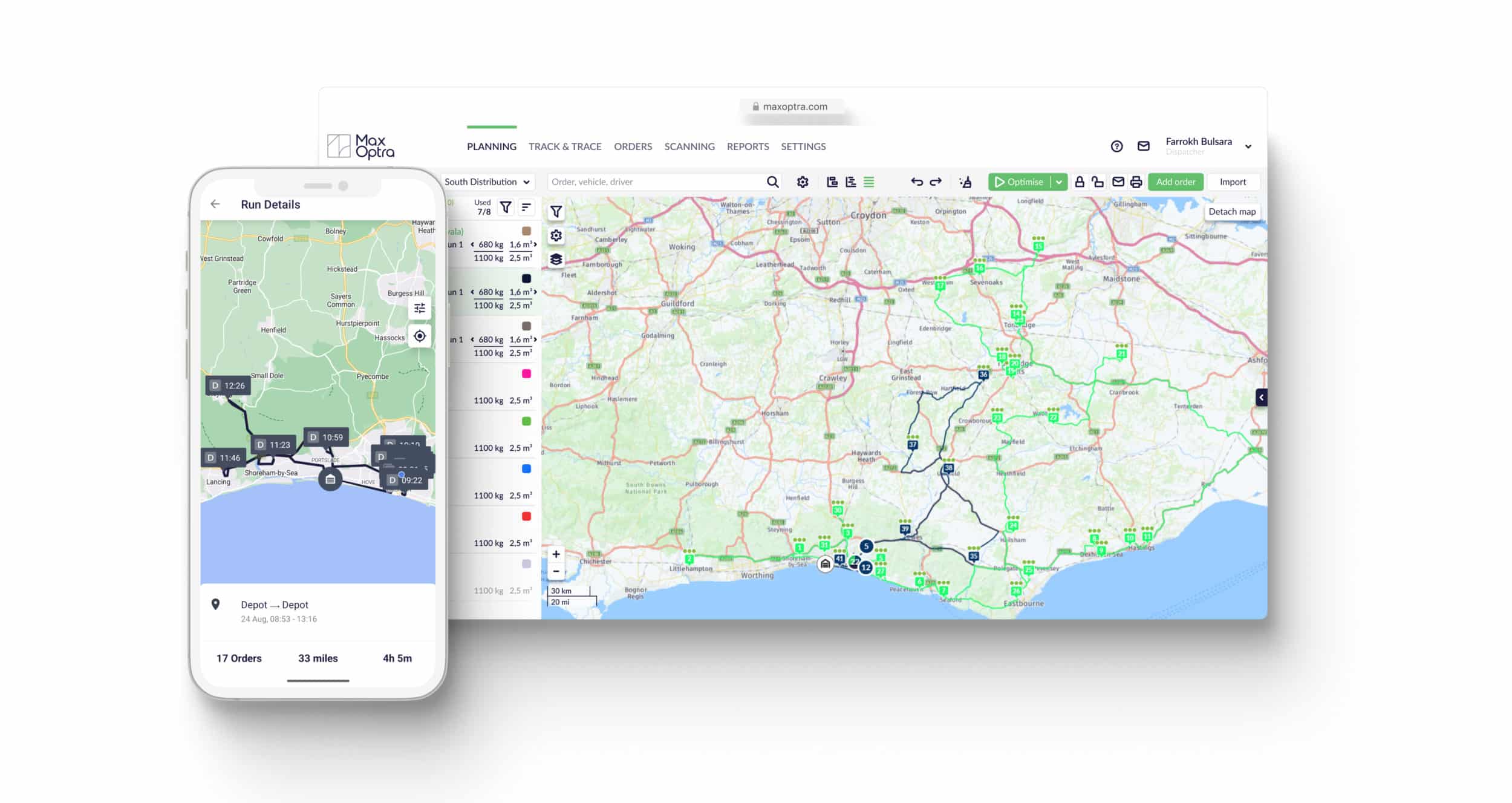
Route optimisation solutions, such as MaxOptra, offer a dedicated platform for business route planning and represent a far more suitable alternative for businesses of all sizes.
Unlike Google Maps, which was built for a variety of consumer purposes, route optimisation software is purpose-built to generate fully optimised routes for commercial operations. By using a solution specifically designed for business logistics, you’ll have access to far more relevant features and a system that can be configured around your unique needs.
Key advantages over Google Maps route optimisation:
- Unlimited stops: Plan routes with 50, 100, or even 200+ stops without artificial limitations
- Multi-vehicle optimisation: Automatically distribute workload across your entire fleet efficiently
- Advanced algorithms: AI-powered optimisation considers traffic, time windows, vehicle capacity, driver skills, and dozens of other real-world constraints
- Real-time visibility: Track every driver on a single dashboard with live ETAs and delivery status
- Customer experience: Automated notifications keep customers informed without manual intervention
- Continuous improvement: Analytics and reporting help you identify inefficiencies and improve over time
- Scalability: Grow from 2 vehicles to 200 without changing systems or processes
Real business impact: Companies switching from Google Maps to professional route optimisation typically see:
– 20-30% reduction in total miles driven
– 25-35% improvement in driver productivity (more stops per day)
– 40-50% reduction in route planning time (hours saved daily)
– 15-20% improvement in on-time delivery rates
– 30-40% reduction in customer service calls asking “where’s my delivery?”
Conclusion: Making the Right Route Planning Choice for Your Business

Google Maps route planner is an excellent tool, for what it was designed to do. As a free, user-friendly navigation app for personal use and simple trips, it’s hard to beat. For businesses just starting out with minimal routing needs (under 10 stops, single vehicle, occasional use), it can serve as a temporary solution.
However, as we’ve explored throughout this guide, the disadvantages of Google Maps for business deliveries quickly outweigh the advantages once you scale beyond the simplest operations. The 10-stop limitation alone makes it impractical for most delivery businesses, and the lack of multi-driver optimisation, real-time tracking, and route scheduling creates operational inefficiencies that cost businesses thousands in wasted time and fuel.
The bottom line: If you’re running a business where route planning is a core daily activity – whether you’re managing deliveries, field service teams, or a sales force – professional route optimisation software isn’t just a “nice to have,” it’s a competitive necessity.
The time saved on route planning, efficiency gains from optimised routes, and improved customer experience from accurate delivery notifications typically pay for themselves within the first few months.
Ready to see the difference? See how MaxOptra saves delivery businesses 20-30% on fuel costs and 3+ hours daily on route planning. Book your free demonstration today and see the difference for yourself.
Frequently Asked Questions About Google Maps Route Planning
Can Google Maps optimise routes with multiple stops?
Google Maps can plan routes with up to 10 stops, but it doesn’t truly “optimise” them in the way professional software does. It provides a basic reordering of stops based on proximity, but doesn’t consider factors like delivery time windows, vehicle capacity, driver breaks, or multi-vehicle coordination. For genuine multi-stop optimisation, especially for business operations, dedicated route optimisation software is necessary.
How many stops can you add to Google Maps route planner?
Google Maps has a hard limit of 10 destinations (stops) per route, including your starting point. This means you can effectively plan routes with 9 delivery stops. This limitation cannot be exceeded or worked around within the platform, making it unsuitable for most delivery businesses that typically handle 15-50+ stops per vehicle daily.
Is Google Maps route optimisation free for business use?
Yes, Google Maps is completely free for business use with no licensing fees or subscription costs. However, the “cost” comes in the form of time wasted on manual route planning, inefficient routes that waste fuel, lack of driver tracking that requires constant phone calls, and the inability to scale operations efficiently. Many businesses find that the time and fuel savings from professional route optimisation software pay for themselves within 30-60 days.
What are the main disadvantages of Google Maps for business deliveries?
The primary disadvantages include: (1) 10-stop maximum per route, (2) no bulk address upload or CSV import, (3) no multi-driver fleet optimisation, (4) inability to schedule routes in advance, (5) lack of real-time driver tracking, (6) no delivery time window support, and (7) absence of performance analytics and reporting. These limitations make Google Maps impractical for serious delivery operations.
What is the best alternative to Google Maps for business route optimisation?
The best alternative depends on your specific needs, but purpose-built route optimisation software like MaxOptra, offers comprehensive solutions designed specifically for business logistics. These platforms provide unlimited stops, multi-vehicle optimisation, real-time tracking, advanced scheduling, and integration with business systems – all the features Google Maps lacks for commercial operations.
Can you track drivers in real-time with Google Maps?
Google Maps offers limited location sharing where drivers can manually share their location, but this requires constant manual intervention and provides no centralised fleet management dashboard. There’s no automatic tracking, no delivery progress monitoring, no ETA calculations for remaining stops, and no way for dispatchers to get a complete view of fleet operations. Professional route optimisation software provides true real-time GPS tracking with comprehensive fleet visibility.
Does Google Maps work for fleet management?
No, Google Maps is not designed for fleet management. It lacks essential features like multi-vehicle optimisation, centralised dispatch, driver assignment, vehicle capacity management, route scheduling, performance analytics, and coordinated fleet tracking. Whilst individual drivers can use Google Maps for navigation, businesses need dedicated fleet management and route optimisation software to efficiently coordinate multiple vehicles.
Maxoptra System
© MaxOptra, 2023. Privacy Policy and Cookies